Forums
I'm just wrapping my head around EE4 templates and explanations. One thing I find daunting is the use of full URLs to a document image in FamilySearch - if only because of the extreme length of some of them which makes final citations rather unwieldy.
Would this variation seem a reasonable alternative? It's patterned on how Ancestry census records are handled in EE4 using Template 5.
Footnote: "Ohio, County Births, 1841-2003," database with images, FamilySearch.org (https://www.familysearch.org/en/search/collection/1932106 : accessed 14 February 2026), Belmont County, volume 3, page 2, Ida C Ambler, 8 July 1885, DGS 4017133, image 6; citing Belmont County Court, Belmont County, Ohio.
This:
1. Provides the URL to the collection search page. There the name as given (as it appears in the document, warts and all) can be searched and quickly get you to the image.
2. Alternatively, the DGS can be specifically searched in the FamilySearch catalog, again getting you quickly to the image.
3. I include the vol/page numbers as well which would allow quickly finding the document if you were looking at the registers on site.
I also keep a copy of the full URL linked to the citation in my database (RootsMagic) in case I ever need it and it's another quick way to get to the image again.
I realize not all that I'm capturing in this might be desired by an editor for a publication, but I think it really meets the twin goals of 1) re-finding the image and 2) evaluating its quality as a source.
Using the collection level URL also allows me in RootsMagic to set up the Master Source with that URL, saving me the trouble of having to enter (yes, it's just copy/paste) the full URL for every citation I write using this source.
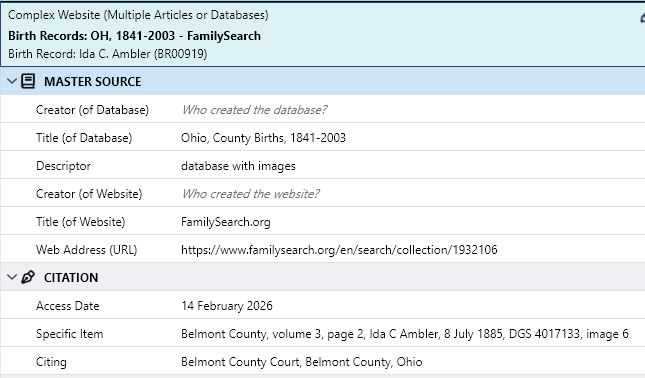
This is what the data entry in RootsMagic looks like:
Hello, Nancy. I'll have to…
Hello, Nancy. I'll have to begin my answers to your questions with questions of my own.
Question 1:
You mention EE’s Template 5 and you show a RootsMagic screen that RM designed for "Complex Website (Multiple Articles or Databases," which is the name that EE4 assigns to Template 5. So I have to ask: Are you analyzing EE’s own Template 5 or are you appraising your problem from the standpoint of the RM template?
Question 2:
Why did you choose Template 5 instead of Template 10? The latter is specifically for images of government/church/agency records that we access through online databases.
Question 3:
You’re citing an image of a birth registration, as found in an online database. That type of citation will vary somewhat, according to whether you are citing
EE4 demonstrates and discusses the different approaches at 11.39—with a faoundational discussion of vital records beginning at 11.28. So, I have to ask: Which EE example or section are you trying to follow?
Using RootsMagic’s template (not EE’s template) you ask whether this modification works:
Footnote: "Ohio, County Births, 1841-2003," database with images, FamilySearch.org (https://www.familysearch.org/en/search/collection/1932106 : accessed 14 February 2026), Belmont County, volume 3, page 2, Ida C Ambler, 8 July 1885, DGS 4017133, image 6; citing Belmont County Court, Belmont County, Ohio.
You’re particularly concerned about having a too-long URL, so you’ve opted to use the base URL for the collection. That, as a principle, is fine. EE has many examples of doing that. However, when we use this approach, we must provide one of two things:
When I use your URL, I get this screen:
So, Question 4:
How do I get from this screen to the next element in your citation: “Belmont County, volume 3, page 2”?
This is obviously not what you intend to cite. The page does provide a link called “View Original Document.” When I click it, I’m at a different URL, with a different set of data for the record being used.
So, Question 5:
Using your preferred format, with the URL being the base URL for the collection, you would need to insert a path to get us from that base to the image itself. How would you describe that path, considering the issues?
RETHINKING THE CITATION:
One absolutely basic principle for citation is this: We cite what we use.
You are using the image. That’s what you need to cite. If you were relying upon information provided in FS’s database entry for that image, then you cite the database entry. If you attempt to cite the original by going through the database entry, then you definitely complicate your citation.
An Evidence Style citation to this register page (with emphasis on original document) would be this;
Layer 1, citing the original register that has been imaged:
Belmont County, Ohio, “Birth Records [Book] 3, 1884-1893,” page 2, line 35, Ida C. Ambler, b. 7 August 1885;
Layer 2, citing the website where the image is found:
imaged, FamilySearch (https://www.familysearch.org/ark:/61903/3:1:33SQ-GRYW-S878 : accessed 17 November 2026) > Image Group Number 004017133 > Item 1 > image 6;
Layer 3: Reporting where the provider says the original is:
citing “Belmont County Courthouse.”
Assembled, the citation would be this:
Belmont County, Ohio, “Birth Records [Book] 3, 1884-1893,” page 2, line 35, Ida C. Ambler, b. 7 August 1885; imaged, FamilySearch (https://www.familysearch.org/ark:/61903/3:1:33SQ-GRYW-S878 : accessed 17 November 2026) > Image Group Number 004017133 > Item 1 > image 6; citing “Belmont County Courthouse.”
Your first concern is the length of the URL. However:
Your second consideration:
You state: "Using the collection level URL also allows me in RootsMagic to set up the Master Source with that URL, saving me the trouble of having to enter (yes, it's just copy/paste) the full URL for every citation I write using this source."
That is a valid consideration. It's also one that EE addresses throughout the volume by offering two different options: “Emphasis on Record” and “Emphasis on Database.” As a starting point, see EE4 §3.16; that's in EE4's new chapter that walks users through the basic instructions for "Building a Citation" and choosing a template. See especially the last paragraph of 3.16 which explains why your draft citation has the disconnect between the URL and the next cited item “volume ... page.”
Note also, in EE4's chapter that focuses upon vital records and registrations (Chapter 11), the foundational discussion at §11.5: Online Resources. That section provides explicit examples of one choice versus the other—i.e., “To emphasize original document” or “To emphasize database.”
As you’ll notice in the example for “Emphasis on database,” it works quite well to use the base URL for the collection and then use the “Specific Item field” of this format to cite all the details for the original book, page, and the specific entry. However, when we take this approach, we still have to provide the path to get from the original URL to that book and page.